
When I started my business as a Virtual Assistant, I was willing to try pretty much anything! I handled everything from ordering client gifts to creating graphics to tracking client payments. One of the first things I realized is that I am not a marketing girl. I think this is because I tend to be a very analytical buyer, and it’s hard for me to truly dive into the more emotional and energetic parts of marketing a product or service. I have so much admiration for the creative minds in the marketing space, and I have been honored to build operational systems for brand designers, social media managers, and marketing strategists. This has helped me better understand the systems that make marketing feel simple and serene. There are two important systems for any business to market itself effectively online: content management and conversion paths.
Content Management
The key with content management is making sure the systems that support content creation are clear, repeatable, and make it simple to post content consistently. If you have a team, the system also needs to make it easy for multiple people to collaborate, often on tight deadlines, to get everything published on time. Let’s talk about a client who pushed me to rethink my entire way of viewing and building content calendars.
Systems in Action - Building a Content Calendar that Fits the Team
A few years ago, I was brought on to build organizational systems for a social media and marketing company. After my initial build-out, I stayed on to help manage the team and tech behind the scenes. Originally, the team managed content through a specialized scheduling software, and each team member managed each piece of content for their assigned brand. I was asked to build in a new content creation system when they decided to transition away from the old scheduling software and move to a more collaborative process where each person was in charge of a specific piece of the content creation process for all brands. The goal was to create a content calendar where it was easy to understand what stage each piece of content was at and what was needed, communicate with other team members, and both have a bird’s-eye view of the entire month across all platforms and dive deep into a specific piece of content. I elected to build the content calendar through ClickUp because it allowed for more customization, various views, comments between team members, and lots of custom fields. I used to build content calendars that focused more on the type of content being created and were built more as a month overview because there was only one or two people creating content. With the transition, I needed to build it based more on the stage of the process each piece of content was in, than on where things were being posted. This allowed the team to easily visualize and understand where they could jump in and complete their part of the process. I found that color coding to be an essential way to visually represent where everything was without having to open things up. The content calendar we built has been used successfully as the team has continued to grow, and they’ve taken on unique new projects!

An example of how I color-code the process in a content calendar
The Steps to Build a Content Management System
Consider the Process
Take some time to map out the process you use to create a month of content, as well as the process for a single piece of content your business produces. Make the steps as small as possible. I’ve outlined the most common processes I’ve seen below.
Monthly Process
Think about the overarching strategy of the month, and what you’ll be promoting each day/week
Brainstorm content ideas
Map ideas to specific days
Outline the details of the content (platform, purpose, type, etc.)
Content Process
Outline the Content - adding inspiration, goals, CTA, etc.
Copywriting - Article copy, carousel slide copy, on-screen text, captions, etc.
Raw Content - Filming, pulling imagery, interviews, etc.
Visuals finalized - Video Editing, graphic creation, inserting imagery, etc.
Review & Edits - Founder/Creative Director reviews the content and sends edits or approval
Revisions - if needed
Schedule/Post
Once you understand the process, you can begin to evaluate what’s needed and by whom.
Consider the Team
Ask each person on the marketing team what they need when they work on their step(s) of the process. It’s amazing what you didn’t know was holding someone back from getting started. It will also be important to make it clear to each team member where they can access what they need, and how to understand it’s their turn to get started. I like to create both a notification and a visual cue for team members to understand when it’s time for them to jump in and complete their step of the process.
Questions to ask your team
What do you need to be successful in x part of the process?
How much time do you need between getting the information/assets you need and completing your step of the process? - Then double or triple whatever they say
What cadence do you prefer? (batching things, one a day, etc.)
Build the Structure
Now that you understand what the stages of production look like, and what everyone on your team needs to be successful, it should be easy to build a content calendar that actually fits you and your team’s needs! I recommend building out your marketing system within your project management system, because it centralizes all back-end operations and encourages more inter-departmental collaboration and understanding. Another recommendation is to utilize color & form to express what stage each piece of content is in. People who work in marketing are often very visual, and it’s helpful to ensure team members can easily understand what’s needed and prioritize accordingly. Finally, I make it easy for your team to toggle between seeing the bigger picture and an individual piece of content to make sure everything is aligned.
Conversion Paths
The thing about Marketing, is that you have to know what you want someone to do next. The key with conversion paths is to direct your audience toward the resources that will help them most. If you’ve been in business for a while, you probably have many free educational resources and are tired of repeating yourself. Instead of creating more new content, take a minute to look at how you can direct people to the resources they need. Lately, I’ve been helping my clients build out conversion paths that direct their audience toward their most valuable content and their paid offerings to get more specialized support!
Systems in Action - Strategic Conversion Paths Built for Growth
A huge part of my work is building systems that support clients after they’ve opted in. More recently, a few of my retainer clients have asked me to dive into the systems that support their audience before opting in. As someone who is intentional with my purchases and becomes very suspicious when I feel like I’m being pressured to hand my money over, it’s been fun to build out processes that support the slower, more considerate buyer. One of the projects I was asked to support this year was for a client who had provided tons of free educational content and was tired of repeating herself. We discussed a few different categories that her content falls into, and created free packaged playlists for people to go through when they enter her world. After the playlist, they enter welcome flows that invite them into her world and share how to get more support and guidance. Now, she can focus on creating new content about the things that inspire her and passion projects rather than answering the same questions over and over again.
Another client has been lucky to grow her audience fairly quickly after going viral a few times the past year. The problem is that some of her fun, lower-investment offers were hard to find. Plus, her welcome sequence was out of date and was speaking to a totally different audience. Together, we identified three big categories in her audience and which of her offerings made the most sense for them. From there, we developed three workflows for new subscribers to go through that spoke to their specific interests and needs. Now she feels confident as her audience grows because she knows they will know how to connect to the resources they need, without any hand-holding. In the first 30 days since building these flows, she saw an 8.3% increase in email link clicks, and some sales!
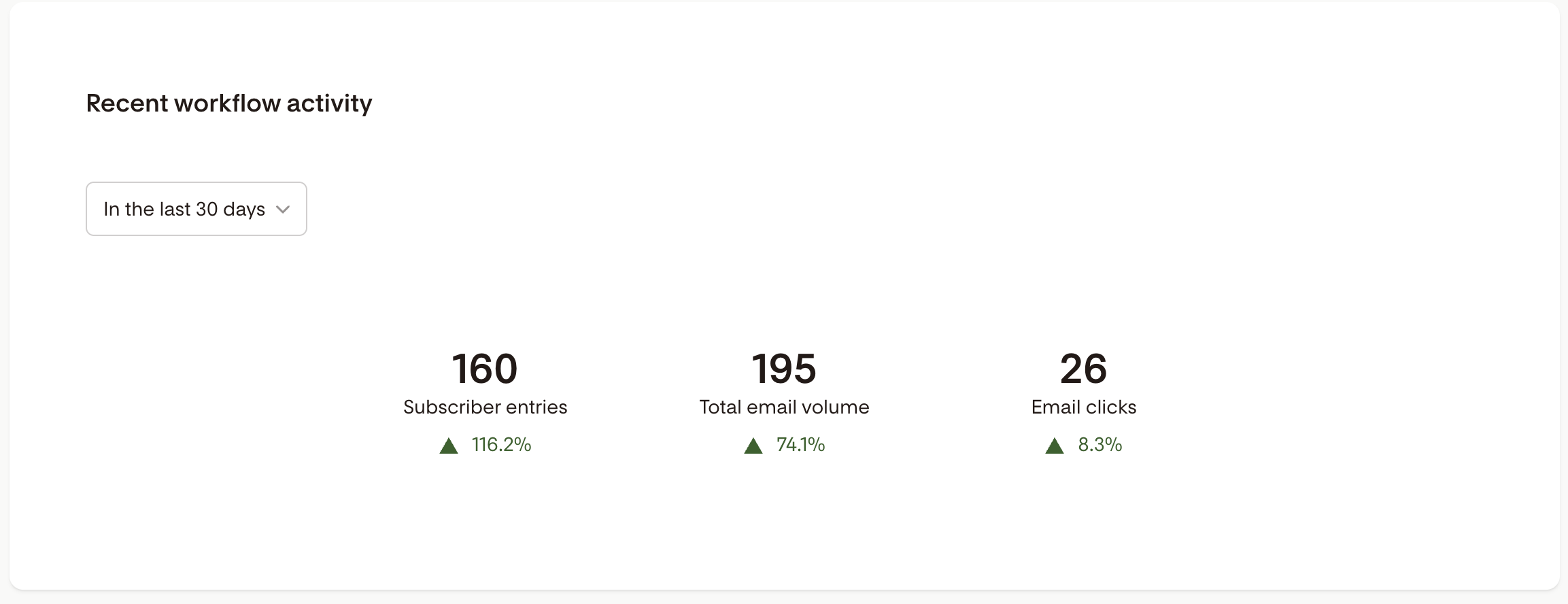
30-day metrics from the welcome flows I supported a client with
The Steps to Build Conversion Paths
Identify your Categories
Each of your resources and services is probably geared toward a specific set of needs. If you’re a graphic designer, your website templates are probably for a different type of client than your full-service brand design service. Writing out a little client avatar for each service can help clarify the different categories that exist within your audience. Take a few minutes to answer the questions below.
Who exists within your wider audience?
Write out a small profile: How old are they? What do they like? Where do they follow you? etc.
Why do each of them follow your work?
What free resource(s) would be perfect for them?
Which paid offering(s) would be perfect for them?
Map out the Path
Now that you know who exists, it’s time to map out a path for each type of person. Think about the steps between discovering you, learning more about you and your biz, and purchasing. Some questions to ask yourself include:
What do they want from you on day 1?
Which resource(s) will help them most?
How do you connect the dots between discovering you, consuming the free content that is right for them, and then purchasing a paid offering?
Now that you understand the steps, draw out a map for each path!
Build the Path
Now it’s time to make the structure that supports the path! This often means putting important links and information in captions, bios, etc. that lead to the right free resource. Then, sending follow-up messages/emails/etc. after opting into the free resource that help the person understand what products/service would solve their problems! Some things to think about include:
What issue does the person have on day 1? - Solve this in a freebie!
What issues do they have after utilizing the free resource? - Explain how you can help in the follow-up email!
What questions do they have before purchasing? - Answer these in another follow-up email!
I highly encourage giving people space and time to breathe between messages, supplying ways for them to easily opt in or out of whatever you’re selling, and adding something fun/vulnerable/valuable in each message so you help your audience connect with you, instead of feeling like an infomercial is shouting at them. Intention matters; be there to serve and support, not just sell.
Ready to get your marketing systems in order? Let’s map them out together!